
Technology · Custom software development
Custom software development for when the work happens between your tools.
Your business already has a system. It is spread across an ERP, three spreadsheets, a WhatsApp group and what two people happen to know by heart. We build the software that gathers it up: your processes, your rules and your states in one place, connected to the tools that already work.
- Internal platforms
- Back-office
- Automations
- Integrations
One request, from start to finish
A new client asks for a quote.
Today · five places
With a system · five states
It is the same journey. In one case a person pushes it along, handover by handover; in the other it moves on its own.
The starting point
The problem isn’t having a lot of tools. It’s that the work happens between them.
Each tool does its own job well. None of them looks after what happens in between, and in between is where it gets decided whether the work moves today or sits there until somebody remembers it.
- Email → A spreadsheetSomeone copies the request across and puts a date on it
- A spreadsheet
- A spreadsheet → The CRMSomeone checks whether that client already existed
- The CRM
- The CRM → The ERPSomeone keys the same details in all over again
- The ERP
- The ERP → A shared folderSomeone files the document and gives it the right name
- A shared folder
- A shared folder → WhatsAppSomeone tells the rest that it is done
What you see, what you buy and what you get invoiced for
What never appears on any invoice
Six tools and five gaps. Not one of the six is responsible for any of the five.
How it shows
- Finding out that something is stuck takes longer than unsticking it.
- Some processes only work because of the one person who has always run them.
- Every report has to be put together by hand, because the figures are never in the same place.
- Growing 20 % means hiring somebody to administer that 20 %.
With judgement
Buy, configure or build.
The question is not which of the three is best. It is how much your way of working has to bend to fit into each one. While the bending is small, off-the-shelf wins every time.
- What the tool will take
- How you actually work
Staying inside costs this
Buy
The process is a common one and somebody has solved it better than we would. You buy it, you set it up and you leave it alone: payroll, invoicing, accounts.
In returnYou work the way the tool works. On a standard process, that costs nothing.
Configure and integrate
A rule of your own turns up and the tool can still follow it: a field it never had, one more status, a connection that was missing. A CRM with your pipeline in it is still a CRM.
In returnYou inherit its limits, and every new version of it can move them.
Build
Staying inside now means doing the work twice, skipping steps and keeping the exceptions somewhere else. And what no longer fits is exactly what sets you apart: how you price a job, how you close one.
In returnYou decide everything, and you maintain everything too.
The line isn’t drawn by what the tool has in its brochure. It is drawn the moment that carrying on with it means working worse.
If an existing tool solves the process well, we say so and we set it up. In plenty of conversations the right answer has been to build nothing at all, and that is part of the job too.
What we build
What a custom system does on the inside.
Business management software of your own isn’t bought by the module: it is built around what it has to do.
The mark that keeps coming back
Call it a request, an order, a case or a job: the name doesn’t matter. The five of them do something different with the same object, and that is why they are one system and not five tools.
Records
where what happens lives, so it exists once
It exists, with a number and owner.
- Clients, contacts and cases
- Quotes, orders and contracts
- Jobs, projects and sites
- Documents, versions and attachments
- History and an audit trail
- Master data without duplicates
Coordinates
how work moves along without anyone pushing it
It changes status. Someone owns it.
- Statuses and life cycles
- Workflows and approvals
- Tasks, owners and deadlines
- Notifications, reminders and escalations
- Users, roles and permissions
- Portals and private areas
Decides
the rules that only make sense here
A rule of yours decides what happens.
- Pricing, cost and margin calculations
- Validations and rules of your own
- Exceptions, limits and alerts
- Assignment and priority rules
- Settlements and period closes
- Automation of repetitive processes
Connects
so a piece of data is only entered once
Out to the ERP, back with an invoice.
- ERP and CRM integration
- Invoicing and accounts
- Payments, receipts and bank feeds
- Email, calendar and signatures
- Our own APIs and third-party ones
- Imports, migrations and bulk loads
Shows
what is visible, to whom, and to decide what
Whoever needs it, finds it.
- Management panels and back-office
- Dashboards by role
- Operational reporting
- Search, filters and saved views
- Exports and generated documents
- Business applications
And what you see in the last one is what decides what comes in tomorrow through the first.
When the process comes in and goes out through the public website, or when the software to be built isn’t for you but to sell to your own customers, that is a different project and we do that too: Custom web development and SaaS. What doesn’t change is who runs it.
Already clear on what you need?
Show us how you work todayThe proof
A refurbishment company running on its own system.
Obrescat is a refurbishment company in Barcelona. We have been with them for more than four years, and their custom panel is now where the work actually happens: clients, quotes, jobs, costs, the bank and profitability inside the same structure.
Obrescat
Refurbishment company · Custom operations systemFrom the quote to the margin on the job, without adding anything up by hand.
What it had to do
That the same piece of data —a client, a quote, a job, a cost— existed only once, and that the profitability of each job could be looked at on any day and not only once it had closed.
What was built
A panel where the quote is built on a price book of their own, the job inherits that quote, every cost is assigned to its job, the bank movements are matched against those costs, and the margin on each job comes out of that on its own.
4+ years
evolving the same system, without rebuilding it.
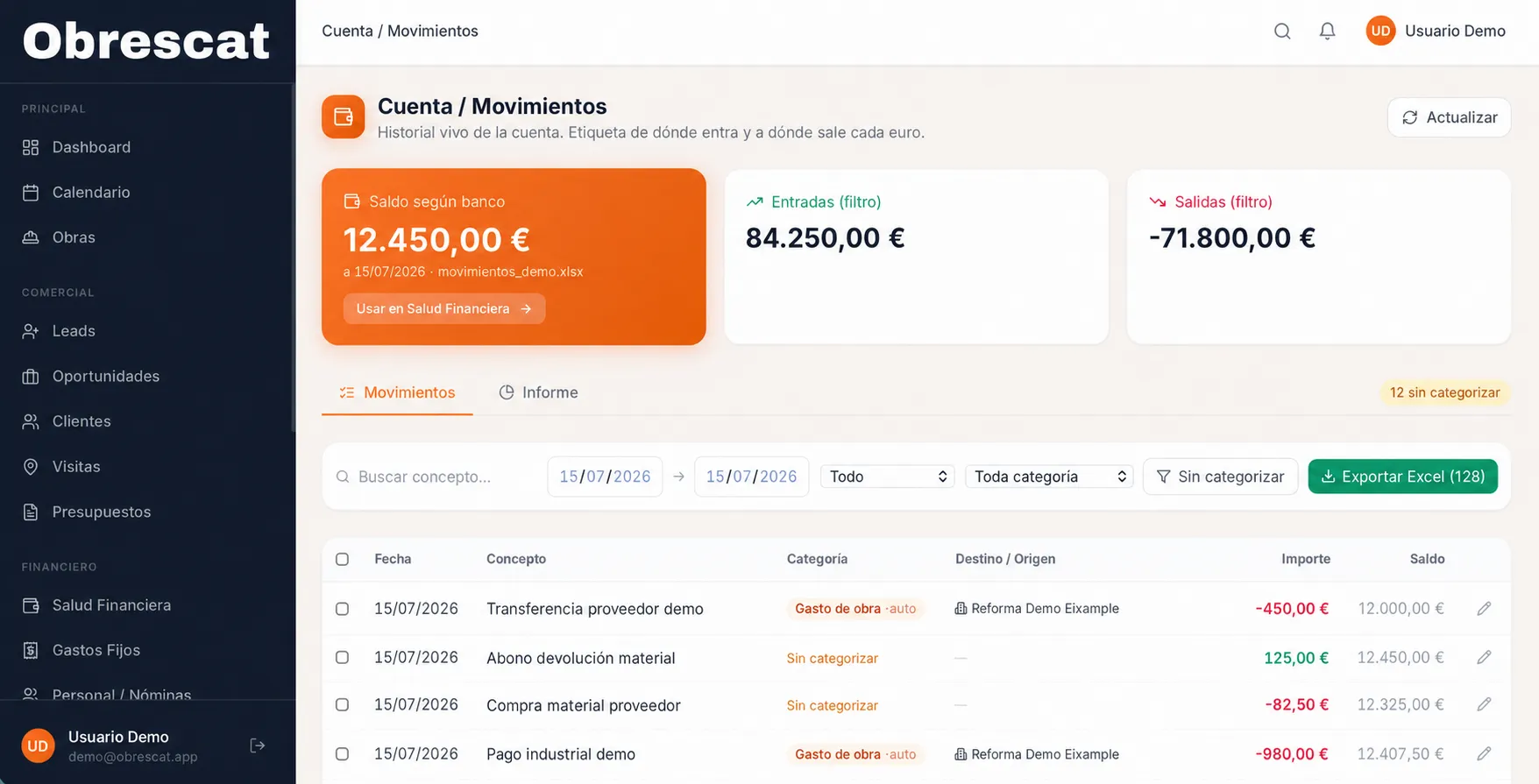
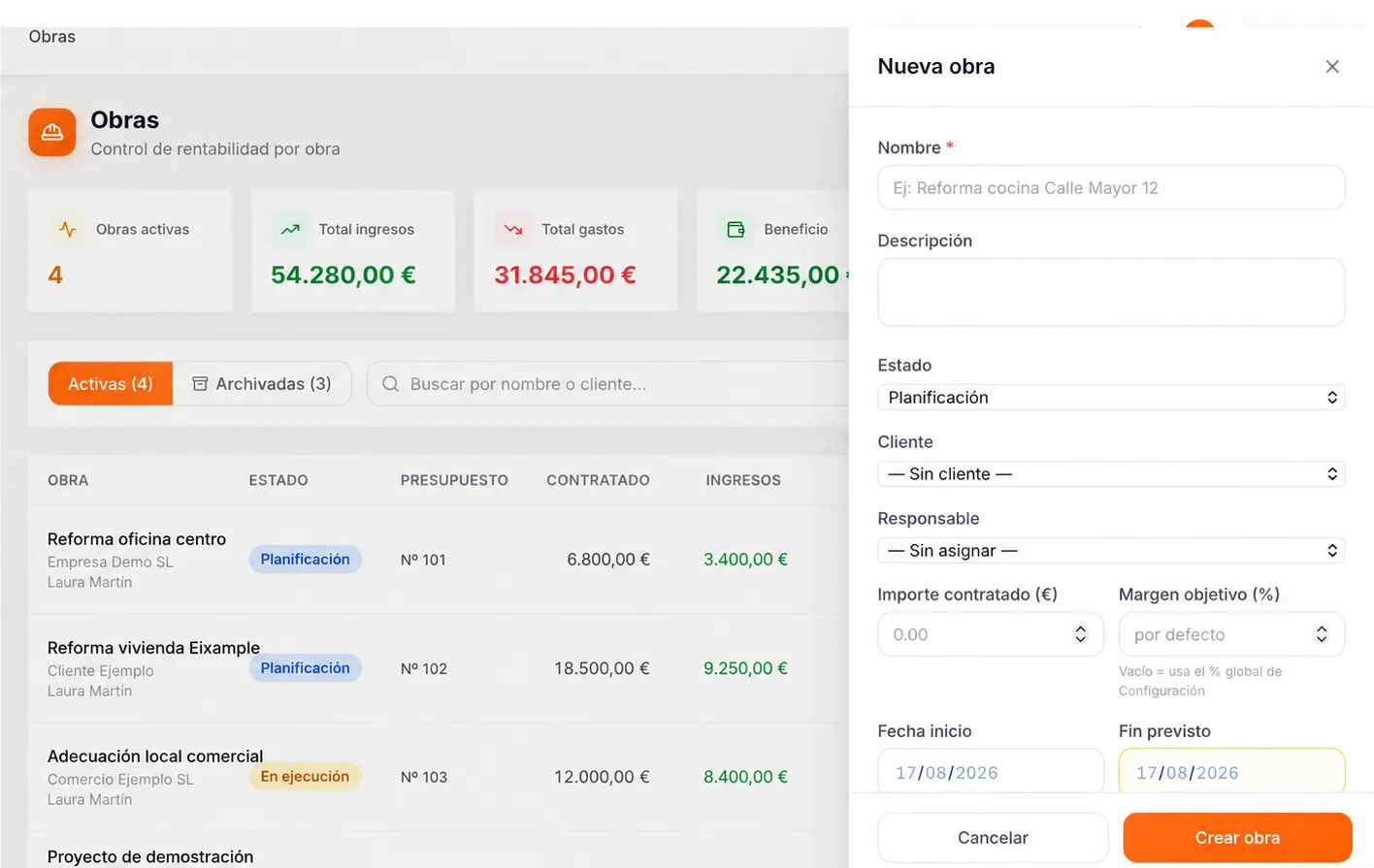
Real screenshots of the panel, with demonstration data.
Nobody at Obrescat opens five tools to find out how a job is going. They open one.
A different kind of software
And when the system is used by different companies, at the desk and away from it.
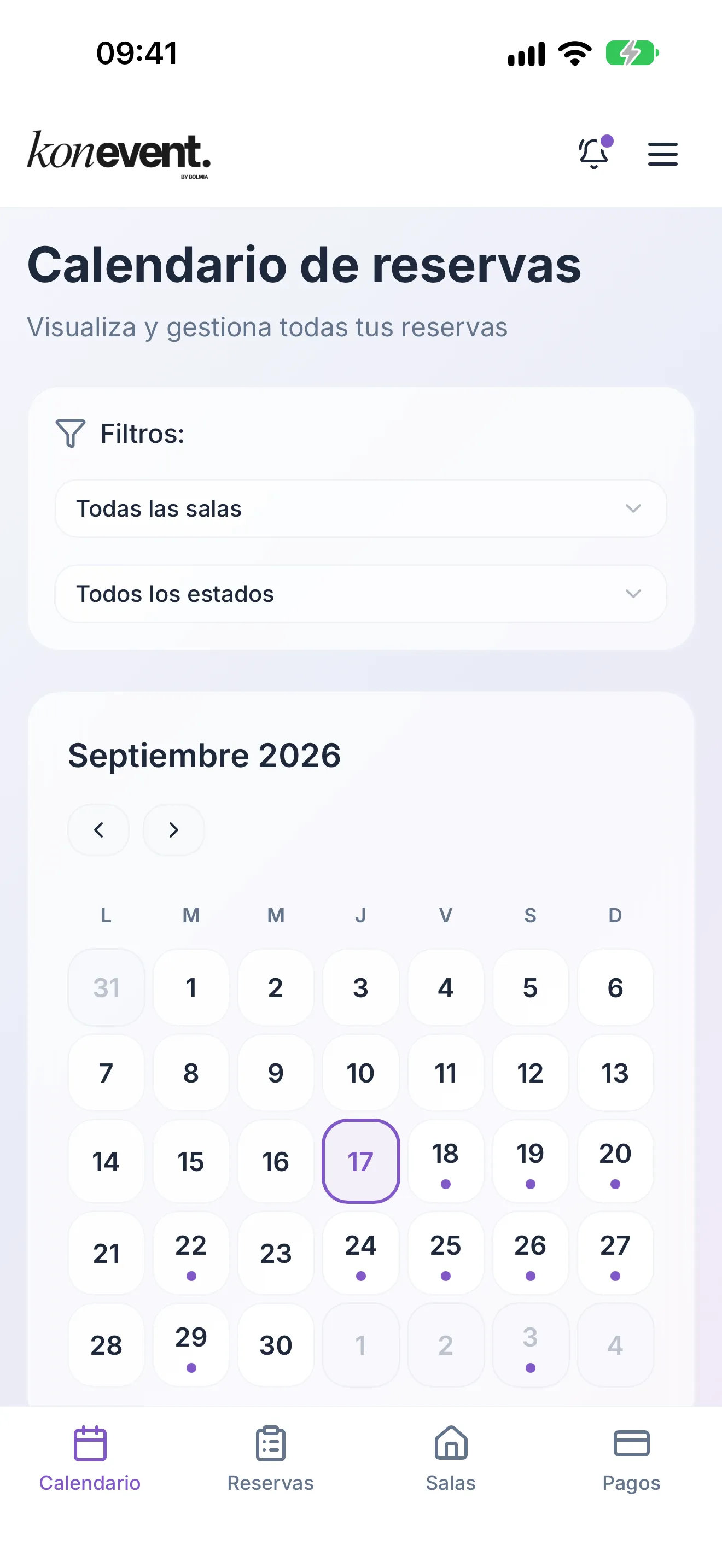
Obrescat organises how one company operates. Konevent proves something else: a multi-company product where each business works in its own space, on top of business logic full of exceptions: time slots, capacities, rates, deposits and cancellations. A web platform, a management panel and a mobile app connected to the same backend.
What sits underneath
- Multi-company: each business in its own space, unable to see the others.
- Users, roles and permissions per company.
- End-to-end workflows: booking, payment, reminder and refund.
- One shared backend and API for the public booking, the panel and the app.
- Payment and email integrations.
- App for iOS and Android on top of that same system.


The app is for companies that already work with Konevent: you sign in with the same account as on the web.
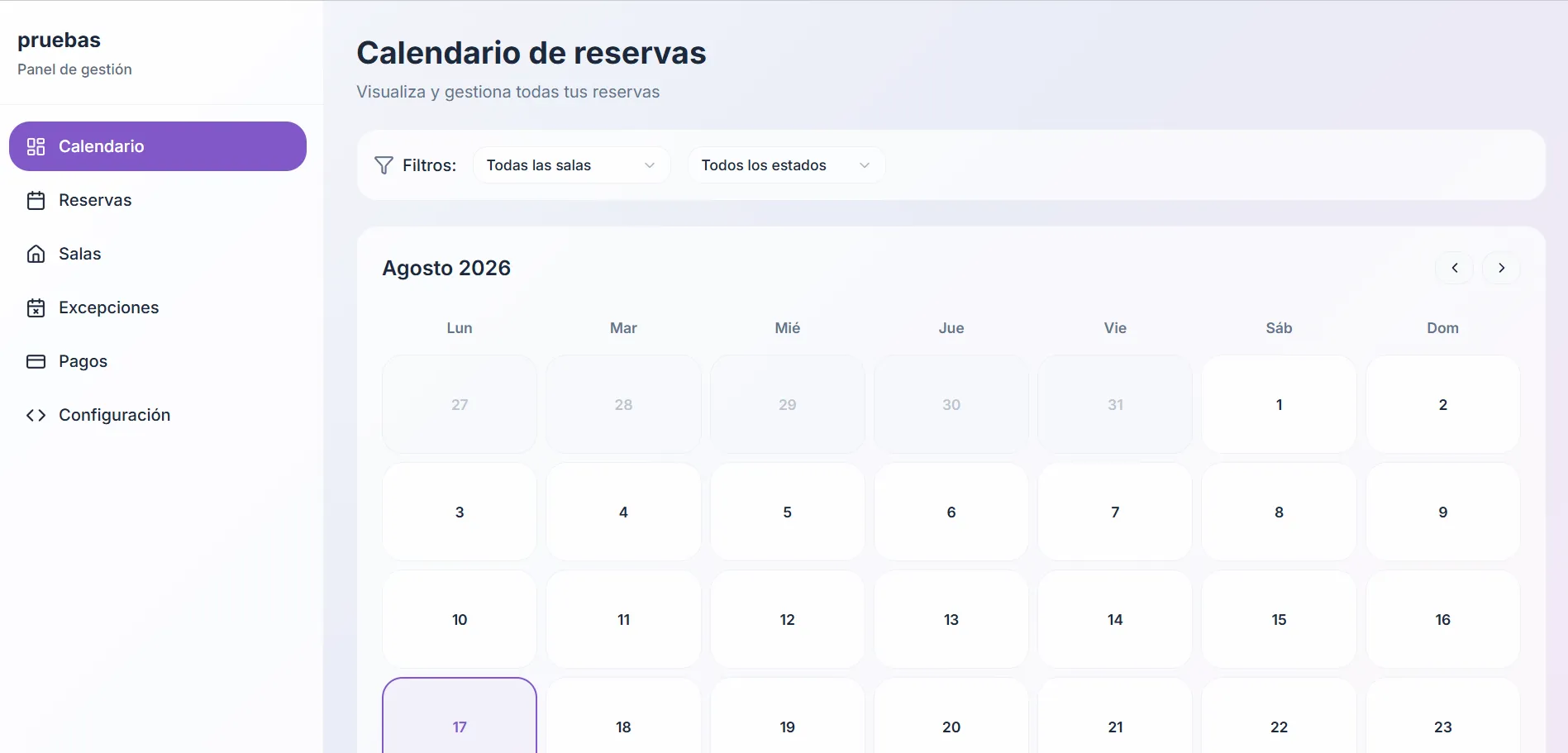
Let’s talk
Show us the process that makes you open five different tools.
You do not need to bring a technical brief or an idea for software. Tell us how that process works today, who runs it and where it gets stuck, and we can tell you whether it is solved by something that already exists or whether it has to be built.
The invisible work
Copying, checking, looking up, remembering, telling, chasing.
Not one of those six actions produces anything. They are the glue between systems that don’t talk to each other, and they are paid for in hours from the people who know the business best.
Any process at all
- Copying the client’s details across
- Checking whether they were already a client
- Looking up what they were charged last time
- Remembering to follow it up
- Chasing the signature
- Telling the team and blocking out dates
- Updating the status in two places
- Remembering what still has to be ordered
- Squaring what was spent against what was planned
When the process lives in a system
The status moves on its own, the data is already written and the notification goes out without anyone remembering. The gap doesn’t close because someone works faster: it closes because there is no gap left.
What happens in between
9
tasks nobody asked for, and not one of them moves the work on
And the people
This doesn’t take people away: it takes away the work nobody should be doing. Copying, checking, remembering and chasing are not decisions. Deciding, negotiating and sorting things out are, and that needs a team with the time to get to them.
One single truth
The same job, four different truths.
It isn’t that the team gets it wrong. It is that each of them is looking at the place where their own part is true, and none of those four places knows anything about the other three.
The same quote, this morning
The Aribau shop refurbishment
Where it is right now
The salesperson’s spreadsheet
Amount€12,400
the last version they sent out
The client’s reply
Amount€11,900
they accepted, but with two items out
The ERP
StatusPending
nobody has touched it since it went out
The WhatsApp group
DateWe start Monday
the site manager is already booking the crew
None of the four is wrong. Each one is true in the place where it lives.
Where it would be
The system
- Accepted · €11,900
- Two items out of scope
- Starts Monday the 6th
And when any of that changes, it changes in the only place it exists — and everything that depended on it finds out.
A date being right in one place and wrong in three others isn’t a problem with how the team is organised. It is a problem with where the data lives.
What already works
Custom doesn’t mean throwing out what already works.
Hardly any project starts in an empty company. There is already an ERP, an invoicing system, a bank, an inbox and a way of doing things. The new part is built around all that, not on top of it.
What comes in
- ERPClients, items and invoices that are already set up
- BankThe account movements, exactly as it exports them
- WebsiteThe enquiries and orders that arrive from outside
- EmailThe documents the client sends over
What gets built
Your processes, your rules and your states. It is the part no tool brings ready-made, and it is the only part that has to be built.
What goes out
- InvoicingThe invoice, with its lines and its description
- AccountsThe cost, already categorised and assigned to its job
- EmailThe notification, to whoever has to act on it
- The boardThe report, without putting it together by hand each month
Data goes in once and travels. The ERP isn’t replaced, and it isn’t asked to do something it was never built for.
How we work it out
We don’t start with the screens. We start with what happens when something happens.
A company’s real process isn’t written down anywhere: it is spread across what each person does and what everybody takes for granted. The work is getting it out of there and turning it into something you can test.
What you tell us in the first meeting
‘When the client says yes, Marta lets purchasing know and blocks the date out in the diary. If they take more than a week to come back, we have to review the price before anything else.’
The rules
- Accepting a quote reserves materials and reserves a date.
- A quote expires after seven calendar days.
- An expired quote isn’t accepted: the price is reviewed and it goes out again.
Three sentences you can argue with one at a time, and the exceptions come out of that argument. The sentence above couldn’t be argued with: it had to be interpreted.
The statuses
- Draft
- Sent
- Expired
- Accepted
- In progress
- Closed
Six, and only six. If a seventh turns up later, it means there was a rule nobody had mentioned.
The behaviour
- On acceptancereserves materials, tells purchasing and blocks the date.
- On day sevenmarks it expired and tells the salesperson.
- On a price reviewa new version is born and the old one isn’t deleted.
This is already the software. And there isn’t a single screen yet.
The use
Marta uses it on real quotes in the first week.
If a rule had been misunderstood you see it there, not six months later. Changing it at that point costs an afternoon.
And only then do we decide which screens are needed and what they look like: the screens are the last decision, not the first. From there the system grows in phases, always starting with the process that hurts most.
Where it fits
When software of your own is worth it.
- The same process runs many times a month and nearly always the same way.
- Whether it gets done depends on particular people doing it by hand.
- The mistakes always turn up at the same point: moving data from one tool to another.
- What doesn’t fit off the shelf is exactly the part that sets you apart.
We work with
- SMEs with processes of their own
- Service businesses
- Manufacturing and production
- Construction and site work
- Administrative teams
- Projects built in phases
Not every process deserves software of its own. If it happens five times a year, if it changes every month, or if you are not yet sure how you do it, a well-built spreadsheet is the better investment — and we say so before we start, not halfway through the project.
Frequently asked questions
What people ask before they commit.
What exactly is custom software development, and how is it different from buying a management system?
An off-the-shelf management system brings a way of working inside it, and the company adapts to that. Custom software development starts from the opposite end: we look at how you work today —what comes in, who touches it, what rules apply, what states it can be in— and build a system that does exactly that. The difference doesn’t show in the screens: it shows in the fact that nobody has to invent a procedure so the software will accept it.
How much does a custom software development project cost?
It depends on how many processes are involved, how many rules of your own they carry, how many people use it with different permissions, and which systems it has to talk to. A panel that puts quotes and jobs in order does not cost the same as a platform with a client portal, payments and an ERP connection. What we always do is pin the scope down before giving a number: quoting an undefined process means quoting two projects at once. And if pinning it down shows that something on the market already solves it, we say so.
How long does it take? Can we start with just one part?
Yes, and it is almost always the better option. You pick the process that hurts most, put it live with people genuinely using it, and grow from there. It lets you validate earlier, spread the investment and find out early —not at the end— that a rule had been misunderstood. Timescales follow how complex the processes are, not how many screens there are.
Do we have to replace the ERP and the tools we already use?
No, and it would usually be a bad idea. Invoicing, accounts, payroll or email are normally well covered by off-the-shelf tools. What gets built to measure is the part none of them covers —your processes, your rules, your states— and it connects by API to the rest so a piece of data goes in once and travels on its own. Where a tool has no API we look at what is possible and say plainly what can be automated and what cannot.
Who owns the code and the data, and what maintenance does it need afterwards?
Scope, ownership and terms of use are agreed in writing before we start, and on a business project the code and the data normally belong to the client. After that, any system in use needs maintenance: updates, security, backups, performance, adjustments and new features. Custom software is not finished the day it goes live: it settles down, and it keeps changing with the company.
How do you control who can see and do what?
With users, roles and permissions defined around your real organisation rather than around a template: who sees the margins, who can approve a cost, who only looks at their own work. On top of that come a record of who did what and when, backups, encryption in transit and access control. If the system handles personal data we scope from the start which data and what for, because that decides where it is hosted and how long it is kept.
What if the way we work changes in a year?
You change the system, which is exactly what you cannot do with an off-the-shelf tool. That is why how it is built underneath matters: if the rules are written in one identifiable place and the states are properly separated, changing a condition is an afternoon’s work. That is the criterion the architecture is decided on at the start, even though it never shows on a single screen.
If you have read this far, the next step is to tell us about it.
Show us how you work today