
Technology · Custom ERP development
Custom ERP development so every operation has one version across the business.
An ERP does not centralise screens. It centralises what is actually happening across the business. An order, a project or a case stops having one version in sales, another in operations, another in the warehouse and another in invoicing. It has one, which each area updates from its own side and everyone reads the same way.
- Clients and orders
- Operations
- Invoicing
- Integrations
The same operation, today
Sales
Order #1842Accepted
the rep closed it on Thursday
Operations
Order #1842Pending
no one has told them it was accepted
Warehouse
Order #1842Being prepared
they heard on the phone and got going
Invoicing
Order #1842No record
as far as they know it does not exist
Four versions of the same thing. Each one is true where it lives.
The same operation, with an ERP
Order #1842Being prepared
Read bySalesOperationsWarehouseInvoicing
Every area still does its own part. What none of them keeps any more is a version of its own.
The starting point
The problem isn’t departments. It’s that each one keeps its own version.
No one is doing anything wrong. The rep closes the deal, someone passes it on, the warehouse gets going, admin invoices. What fails is that the change does not reach everyone at the same time: it arrives by a message, by a phone call, by a spreadsheet someone keeps. Or it does not arrive.
What changes
The client changes the delivery address
Tuesday, 9:40
When each area finds out
Sales
Operations
Invoicing
Warehouse
The order went out to the old address.
What fills the gaps
- Phone calls to confirm something that is already written down somewhere.
- Spreadsheets someone keeps on the side, because they are the only ones up to date.
- Checks to reconcile two lists that ought to be one.
- And every so often, a mistake that gets paid for outside.
One change, several consequences
A decision goes in once and reaches everything that it should.
Confirming an order is not ticking a box. It is half a dozen things someone has to remember to do today, each one in a different place. In an ERP it is a single decision that crosses the areas it affects. And only those.
What a person does
Confirms order #1842.
What gets written, all at once
Sales
The order is closed and the price can no longer be touched.
Warehouse
The units are reserved and stop being offered to anyone else.
Operations
A preparation task opens, with its date and who is responsible.
Documents
The delivery note is built from data that already exists. No one types it.
Invoicing
The invoice is now allowed. Before this it could not be issued.
Accounting
Nothing changes.
That happens when the invoice is issued, not when the order is confirmed.
None of the five is an automation anyone has to invent: they are things that already happen every day. What changes is that they stop depending on someone remembering to pass the word on.
What it manages
An ERP is not a menu of modules. It is the life of one operation.
What gets centralised is not screens: it is one operation — an order, a project, a case, a service — from the moment it comes in to the moment it can be read. Each stage has its own data and its own states, and none of them starts from scratch, because the one before it has already written them down.
Comes in
It is not an order yet. It is someone asking.
- Clients and contacts
- Opportunities and sales stages
- Sales follow-up
- Visits, calls and notes
- A CRM connected to the rest, not off to one side
Is agreed
This is where the business commits to something specific, at a specific price.
- Quotes and versions
- Rates and terms
- Internal approvals
- Orders and contracts
- Changes accepted against what was signed
Gets done
The agreement turns into work, materials and someone’s hours.
- Tasks, states and workflows
- Projects and jobs
- Resource and team planning
- Stock and supplier purchasing
- Issues
- Documents and delivery notes
Gets paid
And here the money closes the loop, which is where the lag hurts most.
- Invoicing
- Payment status
- Costs charged to their operation
- Financial tracking and profitability
Is understood
Before
Someone adds up four places, reconciles them and hands over the number three days late. By then it has changed.
Now
You ask. It is already written down, so the report is a reading and not a reconstruction.
It is not a fifth stage or a reporting module: it is what can be read once the four before it are working from the same version.
Sometimes what is needed is not the shared core. If what gets stuck is one specific operation nobody else touches, or the part the client sees, the job is a different one: Custom software and Custom web development. An ERP does not have to absorb everything for a business to run in order.
Before building anything
Off the shelf, integration or custom. The last one does not always win.
A custom ERP is not the premium tier of an ERP: it is what appears when the way you operate stops resembling everyone else’s. The question is not which one is better, but how closely your process matches what a tool already covers.
Your process
What an off-the-shelf tool covers
An off-the-shelf ERPThe two profiles line up.
If the way you buy, sell and invoice is broadly standard for your sector, there is probably software out there that already fits well. We will tell you so, even if it means there is no development project for us.
IntegrationEach tool covers a stretch, and gaps are left between them.
Here the problem is not that software is missing: it is that there is too much of it and none of it owns the data. The work is to connect them and decide which one is the source for each thing, not to add one more system to the pile.
Custom developmentThe tool gives you too much on one side and not enough on the other.
You pay for modules nobody opens and, at the same time, there are stretches no tool covers — and they tend to be exactly the ones your margin comes from. That is where you build. And almost never the whole thing: only the stretch that does not exist.
The three cases are not three doors. The answer can sit between them: keep what already works, integrate what needs to talk to each other, and build only the part that is yours and nobody else’s. And if the first one is the fit, it is a short conversation.
Already clear on what you need?
Tell us what never matchesThe proof
One project, one quote and one bank transaction in the same system.
Obrescat is a renovation company in Barcelona for which we designed and built a custom management system. We show it because the operation can be followed from the inside: a project exists once, and its quote, its costs, its transactions and its profitability are all data about that same operation.
Obrescat
Renovation company in Barcelona · Custom management systemFrom the quote to the real margin, without leaving the system.
The starting point
Quotes lived in a folder, costs in the inbox and in loose receipts, and the profitability of each project was only known once it had finished, when nothing could be corrected.
What was built
A system where the unit is the project: it gets quoted, it gets contracted with its amount and its target margin, costs get charged to it and it is matched against the bank account. Every transaction knows which project it belongs to.
What changes day to day
The question ‘how is this project doing?’ stopped being a reconciliation job. It is already written down, so you look it up.
What this proves is not a percentage saving. It is that the project, its costs and its transactions are the same operation seen from different parts of the business.
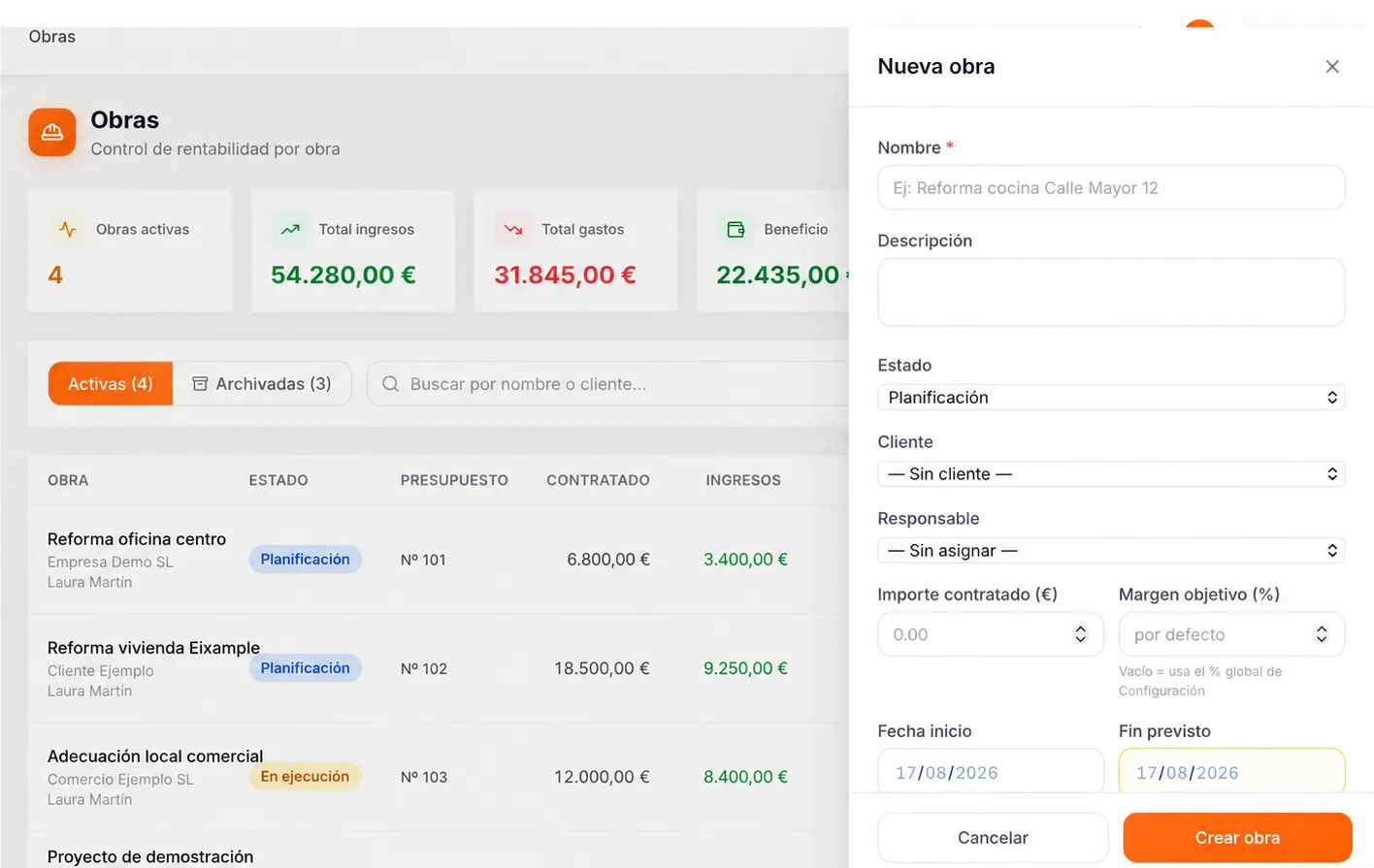
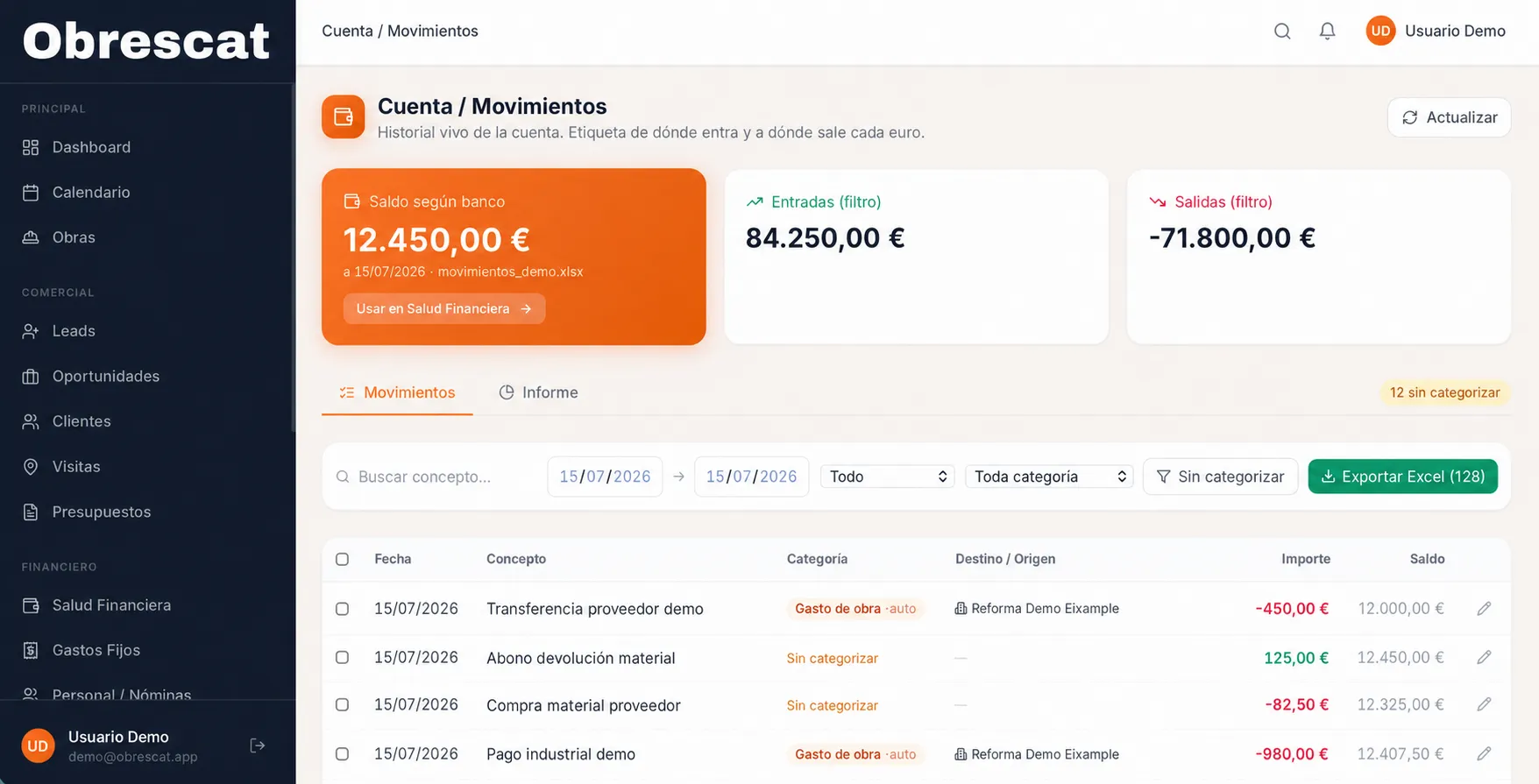
Real product screenshots, with demo data.
Let’s talk
Tell us what you end up checking in three places before you trust it.
You do not need to bring a brief or a list of modules. Tell us which operation gets complicated, where the information stops matching and which tools you work with today, and we can tell you whether this is solved with an off-the-shelf ERP, by connecting what you already have, or by building the part that is missing.
The transition
Changing systems is not uploading files. It is deciding what comes across.
The real objection is rarely the development: it is that the information is spread out and no one has tidied it up in years. Migrating all of it exactly as it stands is the worst option, because the new system inherits the mess with a better appearance.
What is there today
What happens to each one
Three order spreadsheetswith different versions
Cleaned up, and whatever survives comes across
The stock sheetone person keeps it
Not migrated: turned into a rule in the system
Invoices in the accounting software
Connected, and left where it is
Clients in the rep’s inbox
Comes across
Quotes in a shared folder
Comes across
The old system’s databaseten years of history
Consulted where it is, for as long as it is needed
What only one person knows
Not migrated: turned into a rule in the system
Where you go in
- Clients and open operations
- Live quotes
- Invoicing for the current year
For a few weeks the two run side by side: the new system owns whatever is in flight and the old one is there to be looked up. It goes off when no one opens it any more, not on a date marked in the calendar.
We do not promise a perfect migration. We promise to know, before we start, what comes across, what gets cleaned up and what stays where it is.
Integrations
Centralising does not mean putting everything inside.
An ERP that tries to replace every tool ends up doing almost everything slightly worse. What has to be single is the operation itself; the rest can stay where it works well, as long as it talks to it.
Inside lives the operation
- Who the client is
- Where the operation stands
- What was agreed, and for how much
- What is left to do, deliver or invoice
- Which document backs it up
Outside live the tools that do one thing well
- Online shopOrders come in on their own, with their client and with stock already deducted.
- Bank and payment gatewayPayments arrive and are matched to the invoice and the operation they belong to.
- Accounting or your accountantInvoices go out already reconciled and referenced. No one types them again.
- CRM or sector softwareWhatever both sides need is kept in sync, and one of the two owns each field.
- Reporting and BIThey read from the ERP instead of rebuilding the figure on their own terms.
The rule that avoids the messFor every piece of data there is one system that owns it and the rest read it. When that has not been decided, integrating tidies nothing up: it multiplies the versions instead of reducing them.
How we approach it
We do not start with the modules. We start with one operation.
A badly framed ERP gets defined in a requirements meeting and comes out with the modules somebody listed. We follow a real operation from beginning to end and note down where it breaks. That list is what decides what gets built.
Manual jumps still hanging off it
01
We follow one operation end to end
A real order, project or case: who touches it, what state it is in at each step, which piece of data gets written again and what has to be checked in two places before anyone trusts it.
- an email
- a separate sheet
- a phone call
- a copy
- a check
- a re-typed field
02
We separate what is a rule from what is a habit
Not everything that is done today has to come along. An ERP that copies the habits inherits the problem with a better interface. It is the uncomfortable part of the project and it is where you decide whether it will be any use.
- an email
- a phone call
- a copy
- a check
03
We decide what gets centralised, what gets integrated and what stays out
With the whole route in front of you, the decision stops being an opinion: you can see which stretches share the same operation and which can carry on living in the tool that already handles them well.
- a phone call
- a check
04
We go in through the part that hurts most and put it live
Not the whole system: the stretch whose fix is felt in the first week. That is where the rules get validated for real, with real data and with the people who will be using them, before anything else gets built.
- a check
Some branches are left at the end, and they are left on purpose. Approving a discount outside the rate card or holding a delivery back are still someone’s decisions. What should not be a decision is finding out.
Where it fits
When it makes sense to call us.
- The same piece of data lives in several places and does not always match.
- Each area knows its own part, and no one knows the whole without asking.
- There are processes that only work because one person knows how they go.
- Invoicing runs behind what has already been delivered.
We work with
- Service businesses
- Projects, jobs and cases
- A sales side and a delivery side
- Stock and purchasing
- Integration with what you already use
- Phased projects
If the way you operate looks like the rest of your sector and what is missing is order, you do not need a custom ERP: you need to choose a good one off the shelf and set it up properly. That is a different job, and we say so too.
Frequently asked questions
What people ask before they hire.
Do we need a custom ERP, or will an off-the-shelf one do?
Often an off-the-shelf one will do, and we say so even when it is not what we would rather sell. An off-the-shelf ERP starts from a closed structure and the business adapts to it; that works well when the way you operate looks like the rest of your sector. Custom development makes sense when there are stretches of the process no tool covers, when those stretches are exactly the ones your margin comes from, or when adapting to the software would mean working worse than you do today.
How much does custom ERP development cost?
It depends on the scope, on how many areas share the same operation, on how much integration is needed with what you already use, and on whether it is tackled all at once or in phases. There is no single price because there is no single ERP. What we can give you early on is an order of magnitude: for that we need to see one operation from beginning to end, not a list of modules.
How long does it take, and can we start with one part?
Yes, and it is usually the better way to do it. You go in through the part that hurts most — whatever forces people to check in several places today, or whatever holds up invoicing — and you put it live with real data. That lets the rules be validated before the rest is built, keeps the investment under control, and lets the team get used to it in pieces instead of changing system on a Monday.
What happens to all the information we have spread around today?
It gets reviewed before anything is touched, and it is decided case by case: what comes across, what gets cleaned up first, what stays where it is and simply gets connected, and what does not come at all because it is not really data but a habit that has to be turned into a rule. The old history is normally left where it is and looked up as needed. We do not promise a perfect migration; we promise to know what comes and what does not before we start.
Can it live alongside the tools we already use?
That is the normal case, and it is often one of the keys to the project. The ERP can be integrated with the online shop, the CRM, the accounting software or your accountant, the bank and the payment gateway, sector software and reporting tools, through APIs or whatever each one offers. The rule is that for every piece of data one system owns it and the rest read it: without that decision, integrating multiplies the versions instead of reducing them.
What if the team does not use it?
That is the real risk of an ERP, far more than the technical one. It is reduced in three ways: by going in through the stretch whose fix is felt in the first week, by separating in the analysis what is a rule of the business from what is an inherited habit — copying the habits is what gets a new system abandoned — and by validating with the people who will use it before a screen is called finished. If an area has to work worse so the system is happy, the system is badly framed.
Who owns the system, and who maintains it?
The system is yours: the code, the data and the documentation. We handle maintenance, support and its evolution for as long as you want us to, because an ERP is never finished — it changes when the business changes — but it is not tied to us. If another team takes it over one day, they can take it over.
If you have read this far, the next step is to tell us about it.
Tell us what never matches