
Construction management software: off-the-shelf, integrate what you already use or custom development?
What construction management software needs to record, what off-the-shelf programs already handle and when it pays to integrate them or build custom.
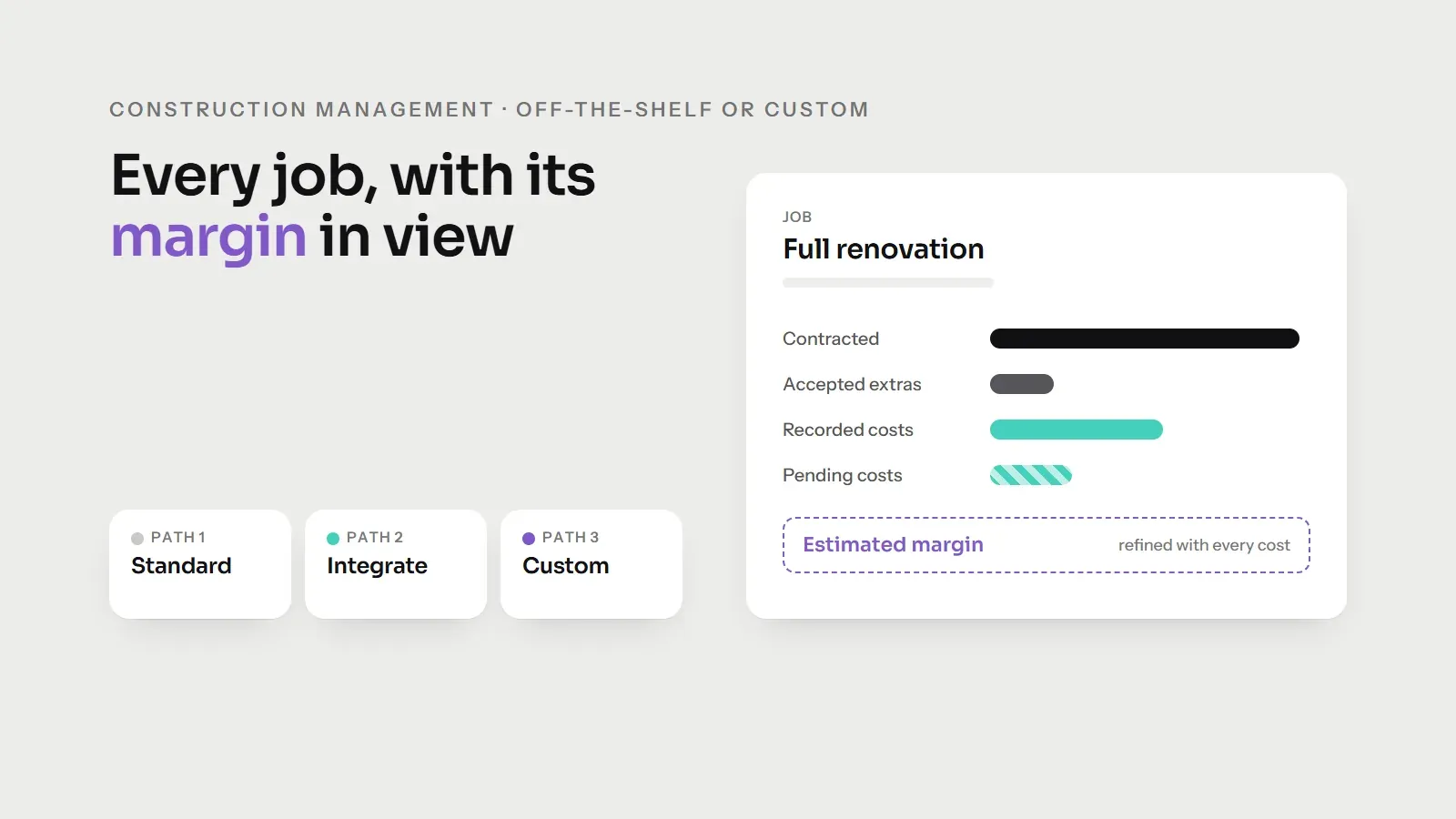
At a renovation or construction company, money is made or lost job by job. Annual turnover can be going well and, even so, two or three jobs may have eaten into the margin of the others without anyone noticing in time. The reason is hardly ever the accounts: it is that the job does not exist as such in any system. The quote is in a folder, the costs are in emails and loose receipts, the payments are in the bank and the changes are in the site manager’s head.
Construction management software is useful if it achieves one thing: that each job has a single version (its quote, what it costs, what has been collected) and that this version is up to date while the job is still open.
The question almost everyone asks is whether to buy an off-the-shelf program or have one custom-built. There is a third answer: keep what works and connect it. This article gives criteria for choosing between the three, explains what the system needs to record in any case and describes how we solved it with Obrescat, a renovation company in Barcelona for which we designed and developed its management system. When the answer is to build it, that is what we do in custom ERP development.
The short answer
- An off-the-shelf program is enough if the way it works resembles yours. A good program on the market can handle many jobs at once, allocate costs to each one and show their profitability while they are carried out. The decision does not depend on how many jobs you run, but on whether it covers what matters to you.
- Integrating is the right move if the program already handles jobs well, but the same data is typed in again in invoicing, in the bank or in a separate spreadsheet.
- Custom development pays off if, after evaluating programs and integrations, important needs remain that none of them handles adequately. Then that part is built (often a system where the job is the unit) and connected to what already works.
Why the problem is the job and not the accounts
Accounting answers “how much has the company made?”. A company that works by jobs also needs to answer “how much is this job making?”, and that question has three complications an accounting program does not solve on its own:
- Costs arrive late. A material is ordered today, delivered next week and invoiced at the end of the month. If the system only sees invoices, the job’s cost is always lagging behind.
- Jobs change while they are being done. The client asks for an extra, a downpipe turns up that needs replacing, a finish is changed. If changes are not recorded with their own amount, the margin gets mixed up and stops meaning anything.
- Money does not come labelled. A bank transaction says “transfer” and an amount. Knowing which job it belongs to is somebody’s work, and if nobody does it, one job’s outstanding payment gets lost among the others.
What the system needs to know about each job
Whether off-the-shelf or custom, the software has to be able to answer these questions. They are also the checklist for comparing programs.
- The accepted quote and the target margin. The job starts when the client accepts a quote. That quote, with its sections and line items, is the reference for everything else, and it is worth setting at contract stage how much you expect to make.
- Every cost, allocated to its job. Materials, subcontractors, hire, transport. If possible, also to the section of the quote. And with the net amount separated from VAT: if the cost is calculated including VAT, the margin is wrong from the first cost.
- What has been ordered even if it has not yet been invoiced. An order placed with a subcontractor is already a cost even if the invoice arrives a month later. If the system does not see it, the job’s cost is always lagging behind.
- Changes, with their own amount. Each extra is quoted, accepted and charged. Recorded separately, the original job’s margin can still be read and the extra does not go uncharged.
- Payments in and out, matched against the bank. Each transaction should know which job it belongs to. This is where most manual work piles up.
- The margin, while the job is still open. With the job under way, the margin is an estimate: the contracted amount, plus accepted extras, minus the costs already recorded and those still to come (what has been ordered but not invoiced, the work still to be done). It is refined as costs come in and only becomes the actual margin when the job is closed. What matters is that it can be checked on any day, not calculated at the end.
What an off-the-shelf program already handles
It is easy to underestimate what an off-the-shelf program does. The documentation for Odoo, to take one example of an ERP with projects, describes a profitability dashboard per project that brings together the revenue and costs linked to each one and splits them into what is expected based on orders, what is still to be invoiced and what has already been invoiced. In other words: several jobs at once, their costs and their profitability during execution, without developing anything.
That is why the useful comparison is not “off-the-shelf versus custom” in the abstract, but program against program using your own cases. Before deciding, ask for a demo and have the supplier walk through a job similar to yours: the quote with its sections, two extras accepted halfway through, costs with and without an invoice, a partial payment and the margin halfway through. Whatever it cannot show you there, either through configuration or an integration, is what would need building.
Off-the-shelf, integrate or develop
| Situation | The sensible option |
|---|---|
| The program fits the way you work: jobs, costs per job and profitability during execution | Off-the-shelf construction management program, or an ERP with projects, properly configured |
| The program handles jobs well, but invoicing, the bank or a spreadsheet are filled in separately with the same data | Integrate: connect what is already there and decide which system is in charge of each piece of data |
| The program covers the general side, but an important part it does not handle well is missing (for example, matching the job against the bank the way you need) | Combination: keep it for what it does well and build the missing layer, connected to it |
| After evaluating programs and integrations, important needs remain unsolved and adapting would mean working worse | Custom development centred on the job, integrated with what is already used |
Three questions help you find your position:
- How closely does the way you work resemble what the program takes for granted? If almost everything fits, off-the-shelf wins: it is cheaper and already proven. If using it means changing exactly what gives you your margin, the program is charging you twice.
- Where is time being lost today? If it is on tasks any program handles (invoicing, keeping contacts), there is no need to build anything. If it is on retyping data that already exists somewhere else, the problem is one of integration. If it is on a question none of the systems evaluated can answer the way you need, a piece is missing.
- What happens to what you already use? There is no need to throw everything out. The rule we apply is the one for any integration: for each piece of data, one system is in charge and the others read it. The invoice can stay in the invoicing software; the job and its margin, in the management system.
If you want the detail on how to decide between an off-the-shelf ERP and your own, it is in custom ERP or standard ERP (in Spanish).
How we solved it with Obrescat
Obrescat is a renovation company in Barcelona that we have been working with for more than four years. We started with the website and lead generation, and then built the dashboard where the job lives. Each layer was opened once the previous one was already working.
What there was: quotes lived in a folder, costs in emails and loose receipts, and the profitability of each job was only known when it was finished, when it could no longer be corrected.
What was built: a custom system where the job is the unit. It is quoted, contracted with its amount and target margin, costs are allocated to it and it is matched against the bank account: each transaction is categorised and assigned to its job. The margin comes from there, and it can be checked on any day, not only when the job is closed. While the job is still open it is what we explained above: an estimate based on what has been recorded up to that day and what is still to come, which becomes the result when the job is closed.
What changes day to day: the question “how is this job going?” stopped being a reconciliation exercise. The status is already written down, so it is a matter of looking it up. The team uses it every day and it has no public side, because it does not need one.
What can be verified is not a savings percentage: it is that the job, its costs and its transactions are the same operation seen from different places. We show it with screenshots of the product, using demo data, on the custom ERP development page.
Signs that your current system has fallen short
- You know how much you invoiced this quarter, but not which job lost you money.
- A job’s cost is worked out at the end, by adding up invoices.
- Extras are charged late or not at all.
- Reconciling the bank takes hours every month and depends on a single person.
- The site manager and the office have different figures for the same job.
- To use the program you have had to invent workarounds that only their creator understands.
None of these signs forces you to develop: several are solved by configuring an off-the-shelf program properly or by connecting it. They help you know what to look for when evaluating it.
When custom development does not pay off
- If an off-the-shelf program, properly configured, covers what matters, even if some habits have to change.
- If there is not yet a stable way of working: it is better to sort out the process first.
- If the only failure is that two programs do not talk to each other: that is fixed by connecting them.
- If nobody in-house is going to keep up the habit of recording costs and changes. A system does not replace that discipline; it only makes it easier.
How much it costs and where to start
In how much a custom ERP costs (in Spanish) you will find the Spanish market ranges with their sources: a custom-developed management system is usually quoted at between €40,000 and €150,000 excluding VAT, and many projects sold as a “custom ERP” are really management software for one or two areas (quotes and jobs, for example), which can sit at the lower end of that range or below it. Implementing an off-the-shelf ERP at a small company usually costs between €3,000 and €25,000 in services, plus licences, according to the same article.
If the decision is to build, it is best to start with the narrowest phase that already answers the important question: the job, its costs and the bank. With that you can already see how each job’s margin is doing, and the rest can come later on the same foundation.
If your company works by jobs and you want to know whether an off-the-shelf program will do, whether you should connect what you already have or build the missing part, tell us how you handle it today. We will tell you so even if the answer is that nothing needs developing; and if something does, this is how we approach custom ERP development.
Frequently asked questions
What is construction management software?
A program in which the unit of work is the job: it stores the accepted quote, allocates costs to it, tracks what has been collected and shows how each job's margin is doing while it is still open. It can be an off-the-shelf product, a custom-built tool or a combination of the two.
Will an off-the-shelf construction management program do?
Yes, and it is often the best option. An off-the-shelf program can handle several jobs at once, allocate costs to each one and show their profitability while the work is under way. It falls short when what matters most to the company depends on rules or data matching that the program does not handle well, either through its settings or through integrations.
When is it enough to connect the program I already have?
When the program handles jobs well and the problem is that the same data is typed in twice: in invoicing, in the bank or in a separate spreadsheet. Then what is missing is an integration and a decision on which system is in charge of each piece of data, not a new program.
When does custom construction management software pay off?
When, after evaluating off-the-shelf programs and the possible integrations, important needs remain that none of them handles adequately and adapting to them would mean working worse. It does not depend on the number of jobs: it depends on whether what matters is covered. Often it is enough to build the missing part and connect it to what already works.
How is the margin of a job that is still open calculated?
As an estimate: the contracted amount, plus accepted extras, minus the costs already recorded and those still to come, such as what has been ordered but not yet invoiced or the work still to be done. It is refined as costs come in and only becomes the actual margin when the job is closed.
How much does custom construction management software cost?
It depends on how many areas it covers. In our custom ERP pricing guide, with Spanish market ranges and their sources, a complete custom management system comes in at between €40,000 and €150,000 excluding VAT, and management software focused on one or two areas, such as quotes and jobs, can sit at the lower end of that range or below it.